


Have you ever wondered what it would be like if your photos could speak? What impact would adding sound to your photos have? How much fun would it be to animate your still images? If these questions intrigue you, then you must explore the remarkable feature of AI Talking Photos. This feature allows you to use AI technology to add sound and animation to your photos, making them more vivid and engaging. In this article, we will introduce Talking Photos, its uses, and how to create them using Virbo's AI Talking Photo feature.
Part A: Talking Photos? What Does It Mean?
1. What Are Talking Photos?
Talking Photos are a feature that uses AI technology to add sound and animation to static photos. With this feature, you can add any voice to your photos or make the characters or objects in the photos come to life. Through this feature, you can make your photos more expressive or create fun videos.
2. How Can This AI Function Help?
Creating Fun Videos: You can use this feature to create entertaining videos, such as making your pets talk, having your favorite celebrities greet you, or having historical figures speak their famous quotes.
Surprising Loved Ones: You can use this feature to create special videos for your loved ones, such as having your family members say what you want to tell them, letting your friends hear your blessings, or expressing your love to your partner.
Adding Freshness to Your Social Media: You can use this feature to create fresh content for your social media, such as having your selfies express your mood, letting your travel photos convey your feelings, or having your food photos speak about your taste.
Part B: Make Photos Talk with Virbo's Talking Photo Feature
If you want to create Talking Photos, then you must try the Virbo tool. Wondershare Virbo is an AI-driven user-friendly AI virtual image video generation tool. It effortlessly converts text into professional spokesperson videos, supporting over 300 voices and languages. Virbo offers over 150 lifelike AI virtual images of different nationalities, ages, and appearances.
Virbo's Main Features
- Optimizing professional scripts with AI.
- Providing over 150 lifelike AI virtual images.
- Supporting over 300 voices and languages.
- Offering assets and templates from various industries.
- Experiencing Virbo's functions online, on desktop, or on mobile devices.
Virbo has many powerful features, such as Talking Photo, AI Script, Video Translator, and Transparent Background. Among them, Talking Photo is a unique feature of Virbo. It is a tool that can turn static images into dynamic narrators. It makes your photos lively and interesting through voice clips, creating engaging memories. This tool allows you to explore a new dimension of storytelling, making your pictures come to life. Whether you are sharing moments, conveying impactful messages, or simply adding a unique touch to your photos, making photos talk is the key to attracting attention and making your stories unforgettable.
Talking Photo's Key Features
- Easily converting text into speech.
- Enhancing your talking photos with personalized background music.
- Efficiently creating and seamlessly editing videos.
- Diverse audio options. You can choose online recording, local upload, or extract voice to customize your talking photos.
Part C: How to Use Virbo's Talking Photo Feature
Step 1: Launch Virbo and select "Talking Photo."
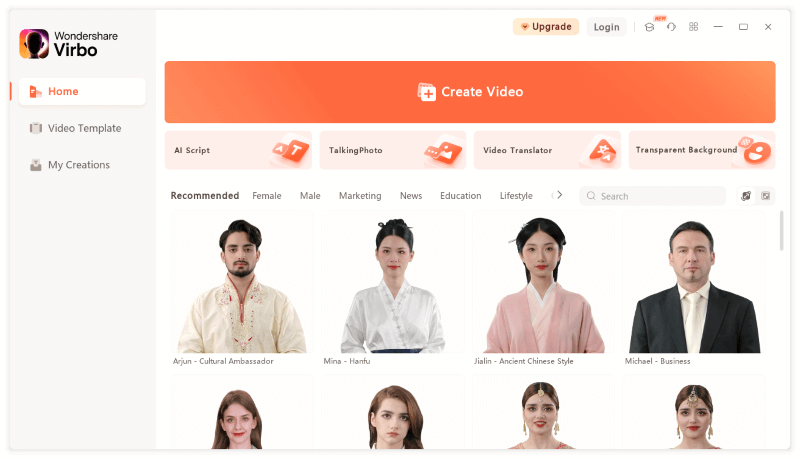
Step 2: Choose an avatar or upload the image you want to use as the speaking avatar, then click "Create Video."

Step 3: Enter or paste text and generate voiceover. You can also use your voice by clicking "Online Recording" or upload audio through "Upload Audio."
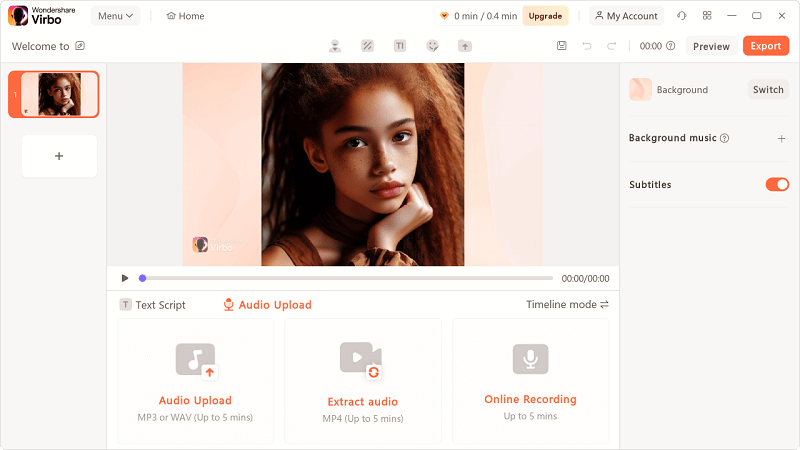
Step 4: Click "Preview" to check the effect of the audio-photo video. Once satisfied with the video, click "Export" to generate it.
Conclusion
Don't miss out on the opportunity to infuse your photos with the magic of AI. Whether you're a seasoned photographer or a casual enthusiast, Wondershare Virbo's AI Talking Photo feature is sure to captivate and inspire. Visit the Wondershare Virbo website today to learn more about this groundbreaking technology and unlock the potential of your photographs like never before.