


Video is a very popular and effective medium for disseminating information and engaging audiences. However, the process of making videos often requires a significant amount of time, energy, skill, and resources. Is there a way to simplify the video production process so that anyone can easily transform their ideas and stories into videos? The answer is yes, and that is by using AI tools to convert text into video.
Converting text into video using AI tools is a process that utilizes artificial intelligence technology to automatically generate videos based on the text content provided by the user. This tool can help users save time, improve efficiency, enhance creativity, expand audiences, and even earn income. This article will introduce the principles of using AI tools to convert text into video and recommend some excellent AI tools that allow you to quickly convert your text into videos.
Part A. What to Know About AI Text-to-Video Tools?
How does AI transform text into video?
The principle behind AI tools converting text into video is based on natural language processing (allowing computers to understand and generate natural language) and computer vision technology (enabling computers to recognize and process images and videos). By combining these two technologies, AI tools can convert text into video through the following process:
- Analyze text content, extract keywords, themes, emotions, styles, etc.
- Match appropriate video materials, including images, video clips, music, sound effects, subtitles, etc.
- Generate the structure of the video, including camera switches, transition effects, voice-overs, subtitles, etc.
- Optimize the quality of the video, including color, contrast, clarity, volume, etc.
- Output video files in different formats, resolutions, bitrates, etc.
What difficulties does AI encounter in converting text to video?
- Complexity and diversity of text content. Different text content may have different purposes, styles, contexts, grammar, logic, etc., all of which can affect video generation and presentation. AI tools need to be able to handle various types of text content, including stories, news, education, marketing, entertainment, etc., and generate suitable videos based on the characteristics of the text content.
- Quality and quantity of video materials. Video materials are essential components of videos. They need to match the text content and also have sufficient quality and quantity to ensure the effectiveness and diversity of the video. AI tools need to be able to quickly select the best video materials from a vast video library and handle issues such as copyright, format, and size of video materials.
- Structure and quality of the video. The structure and quality of the video determine its watchability and attractiveness. They need to align with the purpose, style, and context of the video and require a certain level of logic, rhythm, and aesthetics. AI tools need to be able to generate reasonable video structures based on the text content and optimize the quality of the video to make it clearer and smoother.
What are the main applications of using AI tools to convert text into video?
- Education. Helping teachers and students create instructional videos, course videos, presentation videos, etc., to improve teaching effectiveness and learning interest.
- Marketing. Assisting businesses and individuals in creating promotional videos, advertising videos, product videos, etc., to enhance brand image and sales performance.
- Entertainment. Helping creators and users produce story videos, gaming videos, comedy videos, etc., to increase creativity and fun.
- News. Assisting journalists and media in producing news videos, report videos, commentary videos, etc., to increase the dissemination and impact of news.
- Other fields and scenarios: such as tourism, health, social, art, etc., as long as there is text content, videos can be generated.
Part B. How to Generate Videos from Text with AI Tool?
Novi AI is a tool that can easily convert stories or novels into original videos. Suitable for various occasions and purposes, whether you want to create personal videos, promote your products or services, or create original novels or stories, Novi AI can help you realize your ideas. With Novi AI, you can generate personalized stories or rewrite articles with just one click, and choose from different video styles and voice roles to make your videos more vivid and interesting. The advantage of Novi AI is that it can help you save time and costs without the need to write scripts or shoot videos; you only need to input the story you want to tell to quickly generate high-quality video content.
Key Features
- Easily convert stories or novels into original videos, saving time and costs of writing scripts or shooting videos.
- Support multiple languages and voices, provide various video styles and background music, and match them according to the user's story type and scene.
- Support customization of video duration, resolution, subtitles, watermark, etc., allowing users to adjust the video effects according to their preferences and needs.
- Support exporting videos to local or sharing to social media platforms such as YouTube, Facebook, Instagram, etc., making it more convenient for users to showcase and disseminate their video content.
- Support batch generation of videos, allowing multiple stories to be input at once and generating multiple videos simultaneously, improving user efficiency.
Pros
- Simple interface design, easy to use.
- High-quality generated videos with excellent visual effects.
- Excellent customer service.
Cons
- Limited free features, complete features require subscription to paid plans.
How to Generate Videos from Text with Novi AI
Step 1. Download iMyFone Novi AI and open it to access the "Video Creation" panel.
Step 2. Enter the desired text you wish to transform into a video, configure the settings, and then click on "Continue".
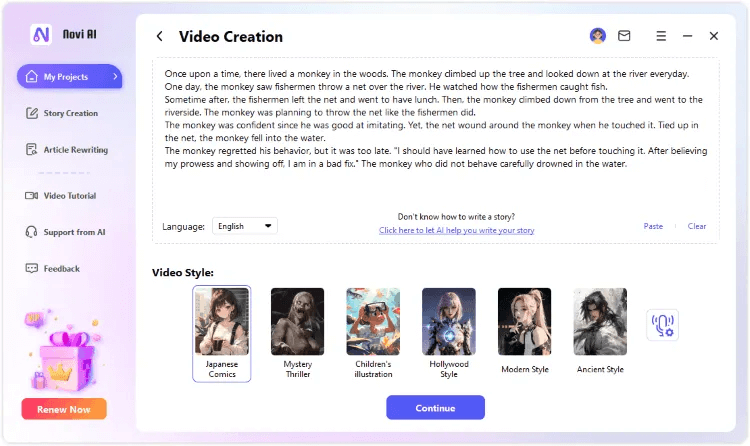
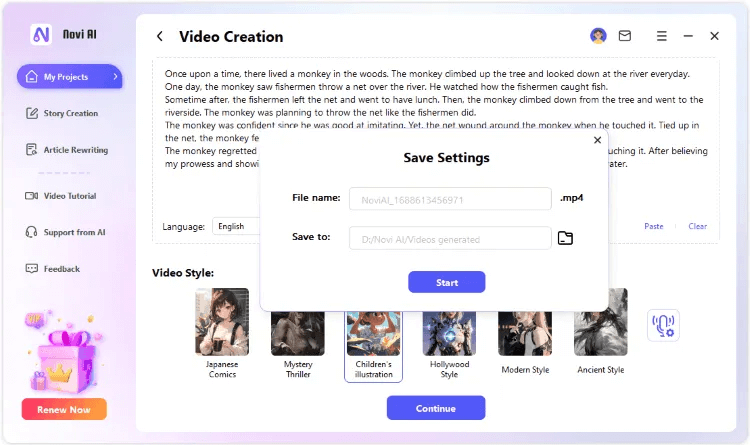
Step 3. Choose the style and dubbing character, and click the "Continue" button. Then name the file and select the location where you want to save the video.
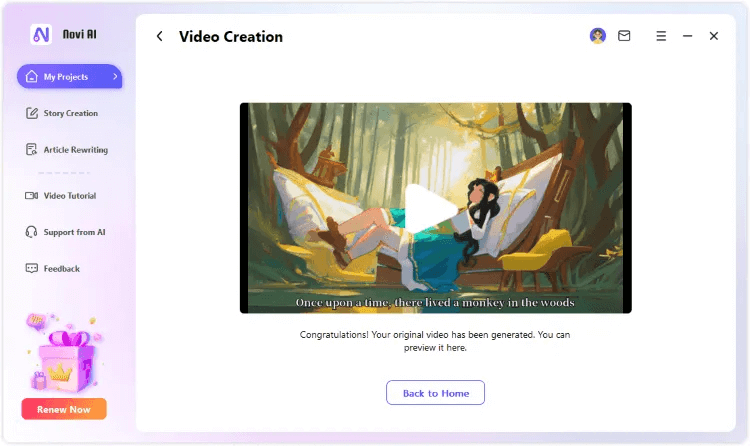
Step 4. Preview the video or return to create additional videos from text.
Part C. More AI Text-to-Video Tools to Recommend
Lumen5
Lumen5 can automatically create video scripts, select video materials, generate video animations, add video music, and output video files based on your text content. Lumen5 has a library of over 10 million video materials to meet your various needs and scenarios. Lumen5 also allows you to customize the style, color, font, logo, etc., of the video to better match your brand and goals.
InVideo
InVideo can automatically select video templates, match video materials, generate video titles, add video sound effects, and output video results based on your text content. InVideo has over 4,000 video templates to accommodate various types and styles. InVideo also allows you to edit video content, length, speed, transitions, etc., to make it more perfect and exciting.
Synthesia
Synthesia can automatically create video characters, select video backgrounds, generate video voices, add video subtitles, and output video presentations based on your text content. Synthesia has over 100 video characters to simulate various languages and accents. Synthesia also allows you to upload your video characters to make them more realistic and personalized.
Conclusion
Using AI tools to convert text into video is a very convenient and effective method that can help you save time, save costs, improve quality, increase creativity, and achieve various purposes and scenarios. This article introduces the principles of using AI tools to convert text into video and recommends some excellent AI tools such as Novi AI, Lumen5, InVideo, Synthesia, etc., allowing you to quickly convert your text into videos. I hope this article is helpful to you!