


In February 2023, Snapchat introduced the intelligent chatbot My AI, utilizing the latest version of Open AI's GPT technology. However, compared to ChatGPT, Snap's My AI has more limitations in answering questions. For some users, My AI has become a channel to learn more about movies, sports, pets, and the world around them. On the other hand, some users prefer to get rid of this feature because, for them, My AI serves no practical purpose. Instead, it pops up during their chats with friends on Snapchat, consistently appears at the top of the chat list, and cannot be removed.
Despite user feedback, Snapchat officials don't seem to have any plans to remove this feature. As a result, many users are searching online for "how to turn off AI on Snapchat". To address this issue, I've written this guide in the hope of assisting you, the reader, in finding a solution.
Part 1. How Do I Get Rid Of "My AI" On Snapchat?
While users can't completely remove the AI chatbot, you can hide it from your feed. Snapchat+ subscribers can follow specific steps to clear My AI from the Chat Feed and reactivate it through the search tool. Here are the steps of how to remove My AI from Snapchat:
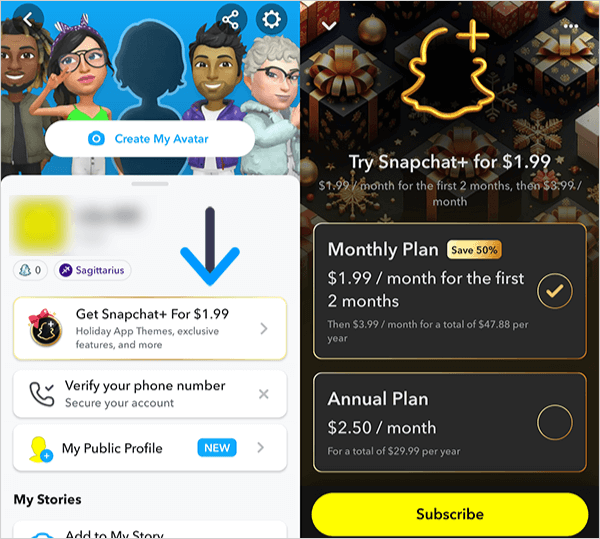
Step 1. Launch your Snapchat and navigate to the Snapchat+ page to subscribe to the plan. The price for Snapchat+ starts at $1.99 per month.
Tip:
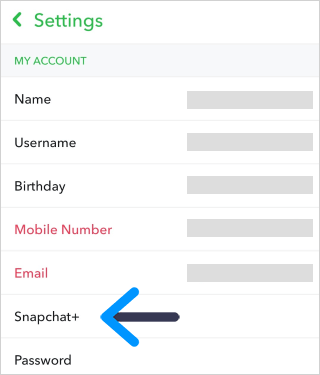
If you can't find the option to subscribe to Snapchat+, you can locate it by going to your profile > "Settings" > "Snapchat+".
Step 2. Select the "Chat" section. Then tap and hold on the "My AI" tab.
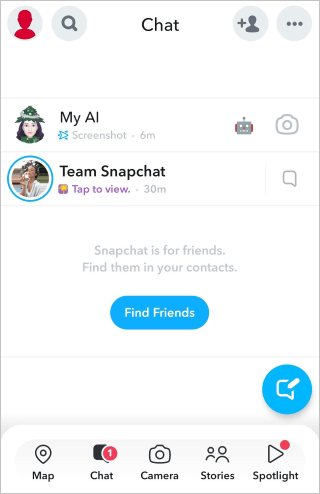
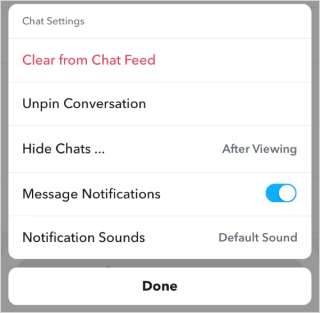
Step 3. Tap the "Chat Settings" > "Clear from Chat Feed" options.
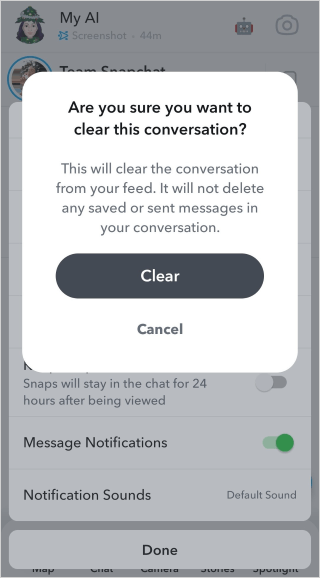
Step 4. Confirm your action by clicking the "Clear" button.
Part 2. FAQs About "My AI" on Snapchat
Q1. Can I get rid of Snapchat AI without Snapchat plus subscription?
No. Free users cannot hide or remove My AI, and this ability is exclusive to Snapchat+ subscribers.
Q2. Can I delete My AI feature on Snapchat for good?
No. Even users with Snapchat+ subscriptions are unable to completely delete My AI. They can remove the chat tab from their Chat screen and unpin the conversation, but there is presently no method to entirely delete My AI feature.
Q3. Can I stop My AI from viewing my Snapchat Stories?
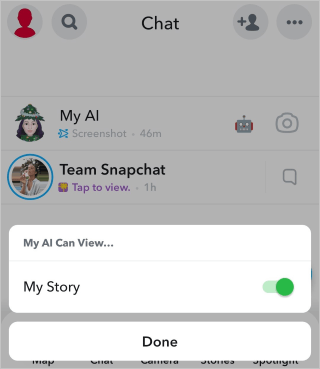
Yes. While Snapchat officials hope that My AI will play a more significant role in users' lives, they do not recommend users disclose personal information in conversations with My AI. For some users, the idea of My AI accessing their Snapchat Stories might be concerning. In such cases, you can choose to turn off this feature in the settings.
This is how to achieve that:
- Long-press the My AI tab and tap "Privacy Settings".
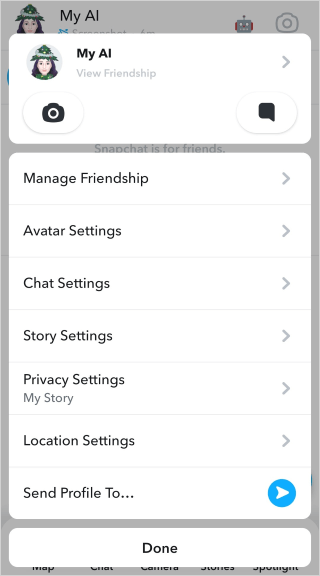
- Toggle off the "My Story" option.
Q4. As a free user, can I delete the data related to My AI's interactions with me?
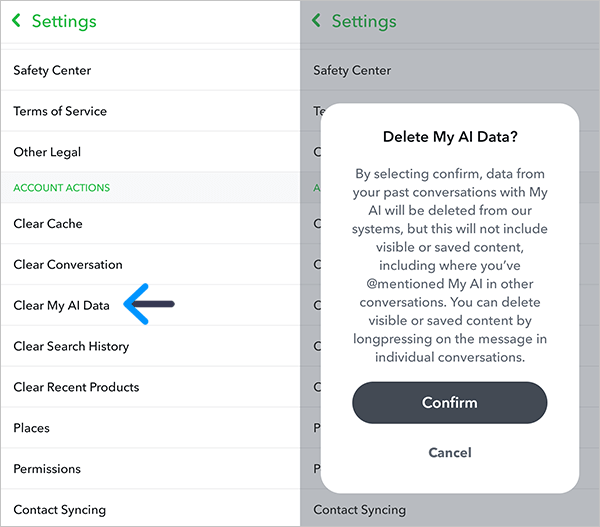
Yes. My AI keeps all the user data from your interactions until you manually delete that data. You can clear all the information collected by My AI in past conversations in the settings.
Here are the steps to do that:
- Open Snapchat, tap on the profile icon in the top left corner, and then on your profile page, click on the gear icon in the top right corner.

- On the settings page, scroll down to the "ACCOUNT ACTIONS" section and click on "Clear My AI Data". Make sure to carefully read the prompts, and then simply confirm to proceed.
Ending Part
While Snapchat's introduction of the My AI chatbot has sparked various reactions among users, ranging from using it as a source of information to seeking ways to remove or limit its presence in their Snapchat experience, it appears that the company is not planning to remove this feature despite user feedback. In the 1st part of this guide, I provide the steps of how to get rid of the AI on Snapchat. However, it's essential to note that the complete removal of the AI chatbot is currently not possible, even for Snapchat+ subscribers.
In the 2nd part, I address some frequently asked questions about My AI. It's notable that free users cannot hide or remove it. Additionally, for some users who have been concerned about My AI viewing your Snapchat Stories, you can adjust the privacy settings to disable this feature. For those wanting to clear the data associated with My AI interactions, this article outlines steps to do so in the account settings. As you navigate your preferences and interactions with My AI, this guide aims to assist in understanding and managing this feature on Snapchat. I hope it will be helpful to you!