


MP4 is a common video format. Sometimes, we may need to transcribe the audio content within MP4 files into text, known as MP4-to-text transcription. This process can be accomplished either manually or using AI. Manual transcription requires a significant amount of time, effort, and money, and it's prone to errors. On the other hand, AI transcription utilizes advanced speech recognition technology, enabling rapid and accurate transcription. This article will explore how to use AI tools for transcribing MP4 files and recommend some excellent AI transcription tools to facilitate MP4-to-text transcription.
Part A. Things You Should Know About MP4-to-Text Transcription
What is MP4-to-Text Transcription?
MP4-to-text transcription is the process of recognizing and converting the speech content within MP4 files into text. MP4 is a common video format capable of storing multimedia content such as audio, video, and subtitles. The purpose of MP4-to-text transcription is to convert the audio content within MP4 files into text for easier reading, editing, translation, and analysis. For instance, you can transcribe the audio content of a video tutorial into text for study notes or reference material. You can also transcribe the audio content of a video conference into text for meeting minutes or reports. Additionally, you can transcribe the audio content of a video clip into text for subtitles or commentary.
The method of MP4-to-text transcription involves extracting the audio content from MP4 files and then transcribing it manually or using AI. Manual transcription is time-consuming, costly, and prone to errors. AI transcription, however, leverages advanced speech recognition technology to efficiently and accurately transcribe audio content, saving time and resources.
Principles of AI Transcription of MP4 Files
The principle of AI transcription of MP4 files involves first extracting the audio content from the MP4 files and then analyzing the audio content using AI models to recognize words, grammar, punctuation, etc. Finally, the recognized results are output as text.
The performance of AI models depends on the quality and quantity of their training data, as well as their adaptability to different languages, accents, noise, etc.
The process of AI transcription of MP4 files can be divided into the following steps:
- Audio extraction: Extract the audio content from MP4 files and save it in formats such as WAV or MP3.
- Audio preprocessing: Preprocess the audio files by reducing noise, adjusting gain, segmenting, etc., to improve the quality and clarity of the audio and reduce the impact of noise and interference.
- Speech recognition: Input the audio files into AI models for analysis, recognize words, grammar, punctuation, etc., and generate a series of candidate words and probabilities. This step is the core of AI transcription and the most complex part.
- Speech transcription: Select the most probable words from the candidate words, form complete sentences, and output them as text.
- Post-processing of text: Perform some post-processing on the transcribed text, such as formatting, validation, correction, translation, etc., to improve readability, accuracy, and information value of the text.
Advantages of AI Transcription of MP4 Files
The advantages of AI transcription of MP4 files include the ability to complete large amounts of transcription work in a short time with high accuracy and low error rates. AI transcription also supports conversion in multiple languages and formats, catering to different user needs. Additionally, AI transcription can provide some additional features such as timestamps, keywords, summaries, etc., enhancing the usability and value of transcribed text.
Specifically, the advantages of AI transcription of MP4 files are as follows:
- Fast: AI transcription can transcribe an hour of audio within minutes, whereas manual transcription may take hours or even days. AI transcription significantly improves transcription efficiency and speed, saving users time and effort.
- Accurate: AI transcription can achieve over 90% accuracy, while manual transcription may contain spelling, grammar, punctuation, etc., errors. AI transcription greatly enhances transcription quality and accuracy, reducing the need for user modifications and proofreading.
- Convenient: AI transcription can be completed with simple operations such as uploading, selecting, and downloading, while manual transcription may require complex steps such as recording, segmentation, proofreading, etc. AI transcription greatly improves transcription convenience and usability, reducing user difficulty and costs.
- Diverse: AI transcription supports conversion in multiple languages and formats such as English, Chinese, Japanese, TXT, DOC, PDF, etc., greatly enhancing transcription diversity and flexibility to meet different user needs and preferences. Moreover, AI transcription can provide some additional features such as timestamps, keywords, summaries, etc., increasing the usability of transcribed text.
Part B. How to Transcribe MP4 to Text via iMyFone VoxBox
iMyFone VoxBox is a free AI speech generator and voice cloning tool. It offers over 3200 realistic text-to-speech voices covering 46 languages. VoxBox's AI voice cloning technology achieves 99% human-like voice accuracy, providing content creators with customized realistic AI voices. It supports various studio-quality audio formats (such as MP3, WAV, etc.) and offers reasonable pricing.
You can use iMyFone VoxBox to transcribe MP4 files and other formats of video and audio files such as MOV, AVI, MP3, WAV, etc. iMyFone VoxBox supports transcription in multiple languages and dialects such as English, Chinese, Japanese, French, German, American English, British English, Mandarin, Cantonese, etc. iMyFone VoxBox also provides advanced features such as editing, translation, export, etc., to make your transcribed text perfect.
Pros
- High quality of text-to-speech and voice cloning.
- Responsive customer service.
- Ease of use.
Cons
- Users have reported issues with using purchased credits.
How to Transcribe MP4 to Text via iMyFone VoxBox
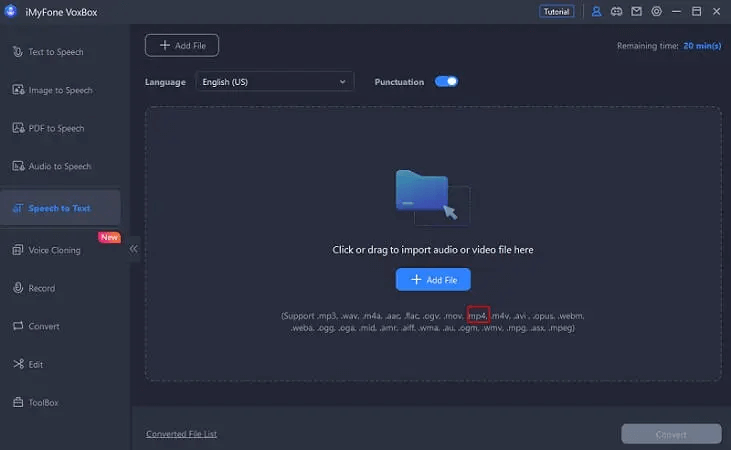
Step 1. Download and install VoxBox on your device. Then launch VoxBox and choose "Speech to Text", then click the "Add File" button to import the MP4 video.
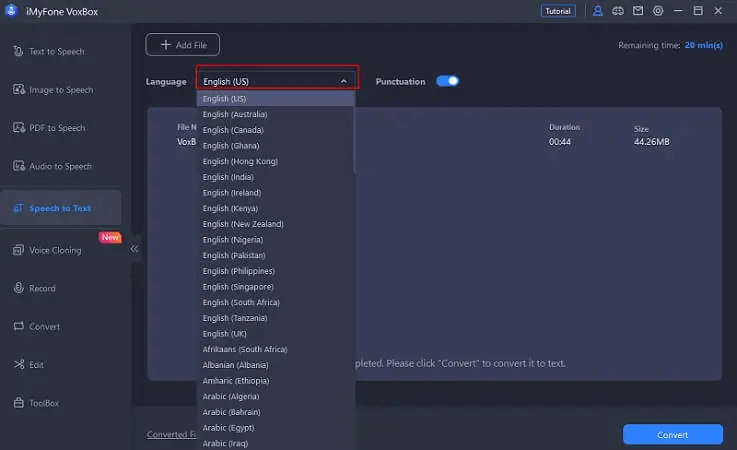
Step 2. Select the language spoken in the video from the list, and click the "Convert" button to start transcribing.
Step 3. Once the process is completed, you can view the generated texts.

Part C. More AI Tools for MP4-to-Text Transcription
In addition to iMyFone VoxBox, there are other AI tools that can help you transcribe MP4 files:
- Google Cloud Speech-to-Text: This is a speech-to-text service provided by Google, accurately converting speech in over 125 languages and dialects into text. It utilizes Google's AI and user-friendly API, allowing easy integration of Google's speech recognition technology into developer applications.
- Rev: Rev is a platform providing transcription, captioning, and translation services, allowing users to transcribe, caption, or translate from anywhere. Users can choose from hundreds of projects and get paid weekly via PayPal.
- Otter.ai: Otter.ai is an AI meeting transcription tool that can transcribe speech in real-time during meetings, record audio, capture slides, extract action items, and generate AI meeting summaries. It can also integrate with your workflow tools to help automate tasks and workflows.
- Sonix: Sonix is an automatic transcription tool that can convert audio and video into text in over 35 languages. It includes a browser editor that allows you to search, play, edit, organize, and share transcriptions. Additionally, Sonix offers automatic translation and subtitle options, as well as a media player for sharing and publishing.
- Transcribe: Transcribe is an AI-driven speech-to-text service. Using the Transcribe app and online editor, you can automatically generate notes from meetings, interviews, videos, etc.
Conclusion
MP4-to-text transcription is the process of recognizing and converting the speech content within MP4 files into text, facilitating easier reading, editing, translation, and analysis of audio content within MP4 files. AI transcription of MP4 files offers advantages such as speed, accuracy, and convenience, making it a highly economical transcription method. This article has discussed how to use AI tools to transcribe MP4 files and recommended some excellent AI transcription tools such as iMyFone VoxBox, Google Cloud Speech-to-Text, etc. Hopefully, this information will be helpful to you.