


If you have a large number of video files and want to convert the speech in them to text, you might find it to be a very time-consuming and cumbersome task. You need to manually play each video, listen to the speech content, and enter it into a text editor. This not only requires a lot of time and effort but also is prone to errors and omissions.
Fortunately, there are some artificial intelligence tools that can help you convert video speech to text, making your work more efficient and convenient. These tools can automatically recognize speech in videos, convert it to text, and provide the corresponding formatting and editing features. You can choose different languages, accents, quality, and speed according to your needs to get the best conversion results.
In this article, we will introduce three of the best artificial intelligence tools that can help you convert video speech to text. These tools are:
We will introduce the overview, main features, pros, and cons of these tools, so you can choose the most suitable tool according to your needs and preferences.
Part 1. Things to Know About Video Speech to Text Conversion
Before we introduce these tools, let's first understand some basic knowledge and considerations about video speech to text conversion.
Video speech to text conversion, simply put, is the process of converting the speech content in videos into a readable text format through artificial intelligence technology. This process usually includes the following steps:
- Extracting audio data from video files
- Performing speech recognition on the audio data to convert the speech signals into text symbols
- Converting the text symbols into natural language through language processing
- Formatting and editing the natural language to fit the target purpose and scenario
Video speech to text conversion has many applications and benefits, such as:
- Improving the accessibility and searchability of videos, allowing more people to understand and utilize video content
- Providing subtitles and translations for videos, increasing the audience and impact of videos
- Providing summaries and analyses of videos, helping to extract key information and insights
- Providing text copies and backups of videos, convenient for storage and sharing
However, video speech to text conversion also has some challenges and limitations, such as:
- The speech in videos may have noise, blurriness, repetition, interruption, and other issues, affecting the accuracy and completeness of recognition
- The speech in videos may involve multiple languages, accents, dialects, professional terms, and other issues, increasing the difficulty and complexity of recognition
- The speech in videos may contain non-verbal sounds, emotions, tones, and other issues, difficult to convert into the expression and meaning of text
- The speech in videos may need to be formatted and edited according to different purposes and scenarios, increasing the workload and time of conversion
Therefore, choosing a suitable video speech to text conversion tool is very important. You need to consider the following aspects:
- The quality and speed of conversion, that is, whether the tool can provide high-accuracy and high-efficiency conversion results
- The functionality and flexibility of conversion, that is, whether the tool can support multiple languages, accents, formats, and editing options
- The cost and convenience of conversion, that is, whether the tool can offer reasonable prices and easy-to-use interfaces
Next, we will introduce three of the best video speech to text conversion tools, so you can compare and choose based on these aspects.
Part 2. Video Speech to Text Conversion Tools
Tool 1. Wondershare Virbo's Video Translator Function
Wondershare Virbo is an AI-driven video generation tool, focusing on creating AIGC "real person" short videos. It can easily convert text into professional spokesperson videos, supporting over 120 languages and voices. Virbo offers over 150 realistic AI avatars, representing different nationalities, ages, and appearances.
Wondershare Virbo's Video Translator function allows you to convert the speech in videos into text with one click and automatically add it to the video as subtitles.
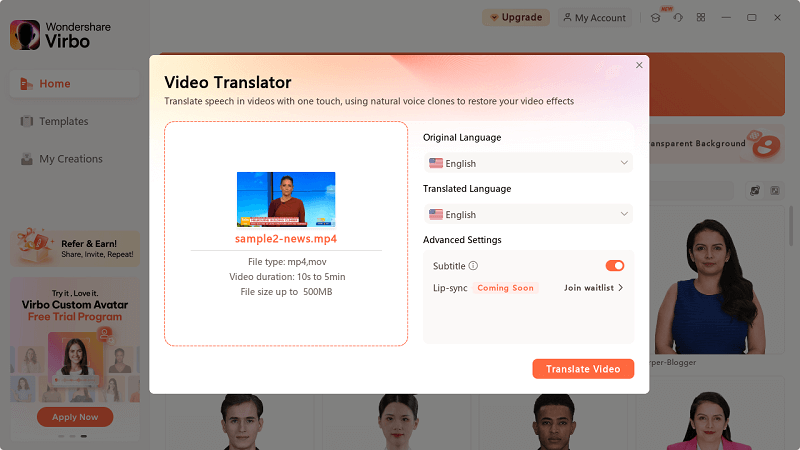
You can choose different languages and accents to get the best recognition results, and you can also edit and adjust the text to meet your needs. You can also translate the text into other languages and add it to the video as bilingual subtitles, allowing your videos to overcome language barriers and attract more audiences.
Key Features
- AI Avatar: Create hyper-realistic avatars for globalized content.
- Scene Templates: Provide rich assets and templates for multiple industries.
- Multilingual Dubbing: Support over 120 languages and voices.
- Intelligent Script Creation: Create professional scripts with a few keywords through AI.
- Cross-Platform Support: Seamless cross-platform experience, whether online, desktop, or mobile devices.
Pros
- Supports speech recognition and translation in multiple languages and accents, including English, Chinese, Japanese, French, German, etc.
- Provides high-accuracy and high-efficiency speech recognition and translation results, based on artificial intelligence
- and cloud computing technology.
- Offers rich subtitle and translation formatting and editing options, including font, color, size, position, timeline, etc.
- Provides a simple and easy-to-use interface, allowing you to complete video speech to text conversion in a few steps.
Cons
- Requires internet access, which may be affected by network speed and stability.
- Requires payment for use, which may not be economical for some users.
- There may be some errors or inaccuracies in speech recognition and translation, requiring manual checking and modification.
Tool 2. Happy Scribe
Happy Scribe's MP4 to Text service is an online transcription tool that can convert MP4 files into text in over 60 languages. It offers two transcription methods: machine-generated and human-made. Machine-generated transcription is extremely fast, with an accuracy rate of 85%; human-made transcription is proofread by experts and native speakers, with an accuracy rate of up to 99%, and completed within 24 hours.
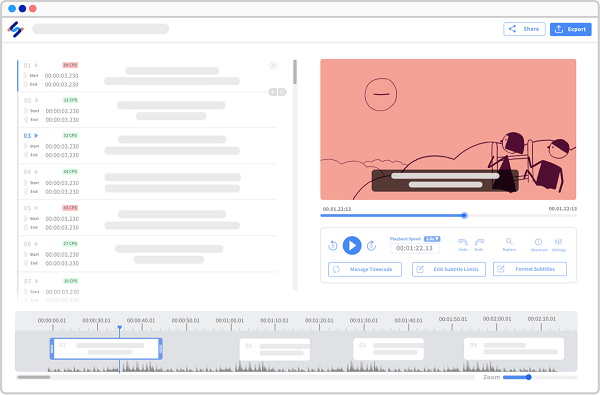
Key Features
- Multilingual support: Supports over 120 languages, dialects, and accents.
- Multiple transcription methods: Offers machine-generated and human-made transcription methods.
- Multiple export formats: Can export MP4 transcription results as TXT, DOCX, PDF, HTML, and other formats.
- No file restrictions: Can upload files of any size and length.
- Cross-platform import: Can import files from anywhere, including laptops, Google Drive, Youtube, or Dropbox.
Pros
- Intuitive interface, easy to use.
- Saves time, making subtitle production more efficient.
Cons
- Feedback indicates that the free trial restrictions are unclear.
- Feedback indicates that the accuracy of transcription is insufficient.
- Some users report that their issues did not receive timely responses from customer service.
Tool 3. Google Speech-to-Text
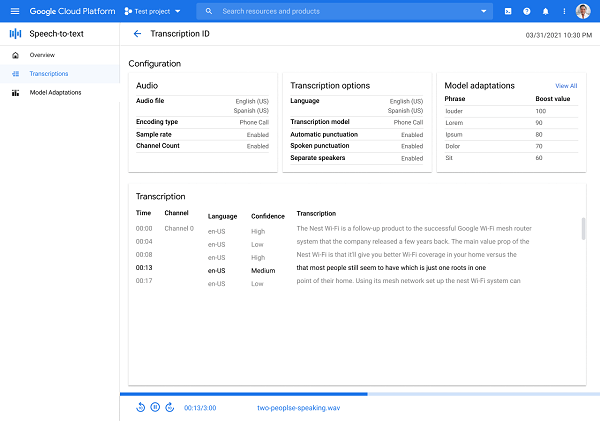
Google Speech-to-Text is a cloud-based video speech to text conversion service that can help you quickly convert the speech in videos to text and provide analysis and integration functions. Google Speech-to-Text allows you to upload your video files or enter your video links, then automatically converts the speech in the videos to text and displays it in an online console.
You can analyze and integrate the text in the console, or connect it with other Google services and applications to enhance the value and functionality of the text; you can also export the text in different formats, including JSON, CSV, XML, etc.
Key Features
- Supports multiple languages, capable of recognizing over 80 languages including Chinese, Japanese, and English.
- Provides a simple and easy-to-use API, convenient for developers to integrate into applications.
- Leverages the latest models to improve the accuracy of speech recognition, especially suitable for creating Voice UIs.
Pros
- Powerful transcription capabilities: Utilizes advanced deep learning neural network algorithms to accurately convert speech to text.
- Multilingual support: Supports over 80 languages and variants, suitable for global users.
- Easy-to-use API: Provides a user-friendly API, convenient for developers to integrate into applications.
Cons
- Requires internet access, which may be affected by network speed and stability.
- Requires payment for use, which may not be economical for some users.
- Does not provide subtitle and translation functions for videos, requiring the use of other tools or services.
Conclusion
Video speech to text conversion is a very useful function that can help you improve the accessibility and searchability of videos, provide subtitles and translations for videos, provide summaries and analyses of videos, provide text copies and backups of videos, etc. In this article, we introduced three of the best video speech to text conversion tools, namely: Wondershare Virbo Video, HappyScribe, and Google Speech-to-Text. These tools each have their own pros and cons, and you can choose the most suitable tool according to your needs and preferences. We hope this article has been helpful to you, thank you for reading!